 Business Intelligence
 Customer Relationship Management
 Document Management
 Finance Management
 Governance, Risk & Compliance
 Human Resources
 Planning and Scheduling
 Product Data Management
 Production Management
 Project Management
 Retail Management
 Sales Management
 Service Management
 Small and Midsize Enterprises
 Supplier Relationship Management
 Supply Chain Management
 Warehouse Management
 e-Commerce
Choosing the right Cloud ERP provider starts with knowing what your business really needs.
Read more to explore the key questions to ask before booking an ERP demo.When you decide to implement an ERP (Enterprise Resource Planning) solution, there are many benefits to look forward to. Better visibility, stronger control, connected departments, improved reporting, reduced manual admin and more reliable data can all make a real difference to daily operations.
However, those benefits depend on choosing the right ERP provider from the start. ERP is not just another piece of software. It becomes part of the way your business runs, so the decision needs to cover functionality, implementation, support, future plans, cost and long-term partnership fit.
This decision has become even more important as businesses place greater focus on connected data, automation, cyber resilience, mobile access, AI readiness, real-time reporting and changing customer expectations.
The right ERP provider should help your business gain control today, while giving you a platform that can grow with you tomorrow.
What should you do before comparing ERP providers?
Before you start comparing Cloud ERP providers, you need to understand what your business actually needs from ERP.
ERP software can support many areas of a business, including finance, purchasing, stock control, production, customer relationship management, supply chain management, reporting, quality, traceability, human resources and warehouse operations.
Not every business will need every feature at the same level. A food manufacturer may place more emphasis on batch traceability, expiry dates, quality records and recall readiness. A distributor may focus more heavily on stock visibility, purchasing, sales order processing and warehouse control. A make-to-order manufacturer may need stronger planning, scheduling, bill of materials control and works order visibility.
This is why the first step should be requirements mapping. Look at where your current systems create delays, duplicated work or gaps in visibility. Speak to the people who use your processes every day, not only senior decision-makers. Finance, sales, purchasing, production, stores, quality and customer service will usually have different pain points.
It can also help to separate your requirements into three groups:
Essential requirements: the features your business cannot operate without.
Important requirements: the features that would improve control, reduce admin or support growth.
Future requirements: the features you may not need today, but may need as the business develops.
This makes ERP conversations more focused. It also helps you avoid being distracted by features that look impressive in a demo, but do not solve your main business issues.
What should you look for in a Cloud ERP provider?
Once you understand your requirements, you can start to compare potential providers. This is where the conversation should move beyond product screens.
A good ERP provider should be able to show how the system would work in your business. They should understand your industry, your operational pressures and the risks you are trying to reduce.

Here are the key areas to review.
Scalability: can the ERP system grow with your business?
Your ERP system should support the business you have now, as well as the business you are working towards.
Ask whether the system can support more users, locations, departments, stock lines, products or processes over time. If you are planning to expand, diversify or bring more activity in-house, your ERP provider should be able to explain how the system would support that growth.
Scalability is not only about size. It is also about operational maturity. A business may start by focusing on finance, stock and sales order processing. Later, it may want to improve production planning, shop floor data capture, quality control or advanced reporting.
A suitable ERP provider should be able to support that journey without forcing unnecessary complexity at the start.
Integration: will ERP connect your systems or replace them?
Many businesses begin their ERP search with a collection of existing software, spreadsheets and manual processes.
Before choosing a provider, you need to decide whether your new ERP system should integrate with your current software or replace some of it entirely. Both options can be valid, but the right answer depends on how your business works.
If you already use specialist software that is central to your operation, integration may be important. If your current systems are creating duplicate entry, inconsistent data or reporting delays, replacing them with a single ERP system may be more effective.
This is an important question because businesses are increasingly looking for connected data. AI, automation and real-time reporting all depend on reliable information. If data is spread across disconnected systems, it becomes harder to trust the answers.
When comparing ERP providers, ask what integrations are possible. Does it have open API? Also ask what can be handled directly within the ERP system. An all-in-one ERP solution may reduce the need for multiple systems, extra licences or separate support relationships.
Accessibility: can your team access the information they need?
Cloud ERP can make business information easier to access across departments, sites or remote locations.
This does not mean every person needs access to everything. It means the right people should be able to access the right information at the right time.
For office-based teams, this may mean live sales, purchasing, stock or finance data. For managers, it may mean real-time dashboards or reporting. For warehouse staff, engineers or shop floor teams, mobile access may support stock movement, job updates, time recording or quality checks.
Accessibility should be reviewed carefully. Ask whether the system works across devices. Ask how user permissions are managed. Ask what happens when staff need access away from the main office.
Good accessibility can improve responsiveness. Poor accessibility can leave teams waiting for updates, relying on paper or working from out-of-date information.
Customisation: how much flexibility will you need?
No two businesses work in exactly the same way. That does not mean every process should be customised.
When reviewing ERP providers, ask how much flexibility the system offers as standard. You should also ask how custom changes are handled, tested and supported.
Customisation can be useful where it supports a genuine business requirement. However, too much customisation can make systems harder to maintain. It can also affect upgrade paths, training and long-term support.
A good ERP provider should help you understand the difference between configuration, process change and true customisation. In some cases, adapting a process to standard ERP functionality may be better than building a custom route. In other cases, a tailored enhancement may be justified.
The key is clarity. You need to know what is standard, what is configurable, what requires development and what impact each option may have later.
Usability: will people actually use the system?
ERP success depends heavily on user adoption.
A system can have strong functionality, but still fail to deliver value if staff find it difficult to use. This is especially important where teams are moving away from familiar spreadsheets, paper forms or long-standing manual processes.
During a demo, look beyond what the system can do. Pay attention to how simple it is to complete common tasks. Can users find information quickly? Are screens clear? Are workflows logical? Can staff understand what action is needed next?
Training also matters. Ask whether your vendor provides training for different user groups. Ask whether training is delivered before go-live, during implementation and after the system is in use.
ERP should support your team, not overwhelm them. A provider who understands change management can make a significant difference to the success of the project.
Support: what happens after go-live?
ERP implementation is not the end of the journey. In many ways, it is the beginning.
Your business will need support once users start working in the system every day. Questions will arise. Processes may need refining. New starters will need training. Your system may need to evolve as your business changes.
Ask what support is included. Find out who provides it, how requests are logged and what response times are offered. You should also ask whether support is handled by the product developer, a reseller or a third-party partner.
This matters because support quality can affect confidence in the system. If your team cannot get timely help, small issues can slow down adoption.
It is also worth asking about account management, ongoing reviews and product updates. A strong ERP partner should not disappear once the system is live.
Security: how will your ERP provider protect your data?
Cloud ERP holds important business information, including customer records, supplier details, stock data, pricing, financial information and operational history.
That makes security a key part of ERP vendor selection.
Ask how your data is hosted, protected, backed up and restored. Ask about user permissions, password controls, multi-factor authentication, disaster recovery and data ownership. You should also understand how software updates are managed, especially where security patches are involved.
Cyber risk is not only an IT issue. It is a business continuity issue. If your ERP system becomes unavailable, many areas of your business could be affected.
Your ERP provider should be a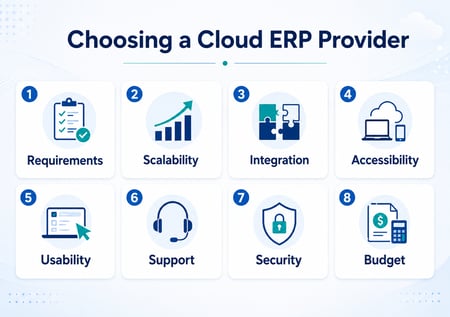 ble to explain their approach clearly. If the answers are vague, that should prompt further questions.
AI readiness: is the ERP system ready for future ways of working?
AI is becoming a bigger part of ERP conversations, but it should not be treated as a buzzword.
The real question is whether your ERP system can provide the reliable data needed to support better decisions. AI features, automation tools or predictive reporting are only useful when the information behind them is accurate, connected and up to date.
In practical terms, this may include demand forecasting, stock recommendations, planning support, anomaly detection, automated reporting or smarter workflows.
When speaking to ERP vendors, ask what AI features are available now. Ask what is on the roadmap. Most importantly, ask what data quality is needed for those features to work effectively.
For many businesses, the first step towards AI is not a flashy tool. It is replacing disconnected data with one reliable version of the truth.
Budget: what is the true cost of ERP?
Budget is always an important part of ERP selection, but it should not be limited to the software licence.
Cloud ERP can offer a different cost structure compared with traditional on-premise systems. In many cases, there is no need for a separate server investment because hosting is included in the Cloud cost. This can reduce upfront infrastructure requirements.
However, you still need to consider the full cost of the project. This may include implementation, data migration, training, support, customisation, integrations, additional users, mobile licences and future changes.
You should also think about internal time. ERP projects require input from your team. Processes need to be reviewed, data needs to be prepared and decisions need to be made.
When comparing providers, ask for clear pricing. Ask what is included. Ask what may be chargeable later. A lower initial price may not always offer better value if important services are excluded.
The right provider should help you understand the total cost, not just the first-year cost.
Questions to ask an ERP vendor
A structured list of questions can help you compare ERP providers more fairly.
Here are some useful questions to ask during the vetting process:
- How long have you been in business?
- Do you have experience in our industry?
- Are you the product developer or a reseller?
- What areas of the system are included as standard?
- Can the ERP system support our future growth plans?
- What deployment options are available?
- How is our data hosted, protected and backed up?
- What support is available after go-live?
- How are product updates managed?
- What training options do you provide?
- Can you support mobile or remote access?
- How do you handle customisation?
- Can the system integrate with our existing software?
- Which processes could the ERP replace entirely?
- Can you provide customer references?
- What does a typical implementation look like?
- Who will manage our project?
- How do you help reduce risk during implementation?
- What is on your product roadmap?
- What makes your ERP different?
These questions should help you move beyond a simple feature comparison. They also give you a clearer view of the provider behind the product.
Choosing the right ERP provider for your business
Finding the right Cloud ERP provider is not easy, but a structured approach can make the decision clearer.
Start with your business requirements. Understand where your current systems are holding you back. Think about what you need today, but also consider what you may need in the future.
Then review each ERP provider against practical criteria such as scalability, integration, usability, accessibility, support, security, AI readiness and total cost.
The right ERP solution should do more than solve one isolated problem. It should connect your people, processes and information in a way that gives the business greater control.
Taking the time to choose carefully can help you avoid costly mistakes. It can also give your business a stronger foundation for growth, resilience and smarter decision-making.
If you are reviewing ERP options, now is the right time to understand what your business really needs from its next system.
Book a demonstration with WinMan to explore how an all-in-one ERP solution could support your business.

FAQs
What is a Cloud ERP provider?
A Cloud ERP provider supplies ERP (Enterprise Resource Planning) software that is hosted in the Cloud rather than installed only on local servers. This can reduce infrastructure requirements, improve remote access and make updates easier to manage.
How do I choose the right ERP provider?
Start by mapping your business requirements. Then compare providers against industry experience, functionality, scalability, support, security, usability, implementation approach and total cost of ownership.
Is Cloud ERP better than on-premise ERP?
Cloud ERP can reduce infrastructure requirements and support easier access across locations. On-premise ERP may still suit businesses with specific control, latency or internal IT requirements. The best option depends on your business needs, budget and risk profile.
What questions should I ask during an ERP demo?
Ask the vendor to show how the system handles your real processes. This could include sales orders, purchasing, stock movements, production planning, batch traceability, quality checks, invoicing, reporting and management dashboards.
What does AI readiness mean in ERP?
AI readiness means the ERP system has the data quality, structure and connectivity needed to support automation, forecasting or smarter reporting. Before AI can add value, your business needs reliable data in one connected system.




.png?width=120&height=120&name=MicrosoftTeams-image%20(4).png)